Leather is one of the most demanding product categories to photograph and retouch for e-commerce. Unlike matte products that absorb light evenly, leather presents multiple surface qualities simultaneously — matte panels, semi-gloss areas, deep grain texture, and metallic elements like zippers, buckles, and rivets — each requiring a different approach to look premium rather than flat.
This guide covers the full workflow: from raw product shot through to a marketplace-ready optimized image, with specific techniques for the challenges unique to leather goods.
The Core Challenges of Leather Product Photography
1. Mixed Surface Reflectivity
A leather jacket, for example, has matte panels on the body but semi-gloss on the seams, glossy chrome zippers, and matte lining. Studio lights that correctly expose the jacket body will often blow out the chrome hardware. Managing this range requires either controlled directional lighting or careful dodge-and-burn retouching in post.
2. Texture vs. Sheen Balance
Over-lit leather looks plastic and cheap — the natural grain disappears. Under-lit leather looks flat and unappealing — the richness of the material is lost. The optimal result shows the grain texture clearly while preserving the characteristic sheen of the leather type.
3. Color Accuracy
Black leather photographed on a white background picks up blue or grey casts from reflected ambient light. Brown leather picks up warm orange or cool green casts depending on the studio environment. Color correction for leather requires matching the true color against a physical reference, not just making it look visually appealing.
4. Shape Communication
Leather items like bags and jackets need to communicate their three-dimensional shape clearly. Flat-packed or poorly stuffed bags look limp and unimpressive. Jackets on transparent mannequins or with internal support need correct posing to show the garment's silhouette at its best.
Step-by-Step Optimization Workflow
Step 1: Background Removal
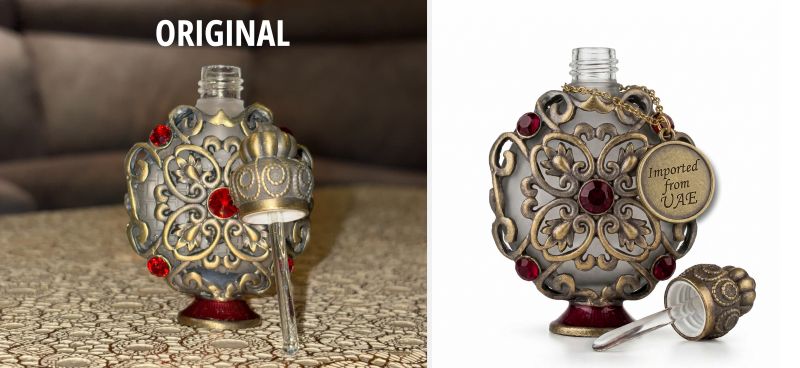
The first step for any e-commerce main image. Remove the background completely and replace with pure white (RGB 255, 255, 255). For leather products with complex silhouettes — fringe on jackets, stitched edges on bags, chain details — use a combination of AI-assisted masking and manual path refinement for clean edges without halo artifacts.
Step 2: Perspective Correction
Raw product shots often have slight angle distortion — particularly if photographed from below, above, or at an angle. Use Photoshop's Perspective Warp or Transform tools to correct keystone distortion and present the product with a neutral, straight-on perspective that reads correctly at thumbnail size.
Step 3: Lighting Reconstruction
After background removal, the original lighting often looks wrong against pure white — natural shadows are lost, reflections look disconnected, or the overall tone goes flat. Use dodge and burn to rebuild studio-quality lighting: lighten the tops of surfaces that would catch overhead light, deepen the undersides and creases, and restore the directionality of the original light source.
Step 4: Texture Enhancement
For leather grain: apply a high-pass filter layer in Soft Light mode at low opacity to sharpen fine texture without creating noise. For stitching: selectively sharpen the stitch lines to make craftsmanship detail visible at zoom level. For chrome hardware: use targeted curves adjustments to restore the full highlight-to-shadow range that compression or overexposure may have crushed.
Step 5: Shadow Creation
A product floating on a white background looks unnatural and low-quality. Add a contact shadow (soft, elliptical) directly beneath the product at low opacity to ground it naturally. For bags and boxes, a cast shadow to one side reinforces the three-dimensional form.
Step 6: Final Color Grade and Export
Apply a global color correction to match the final image against a physical reference in neutral daylight. Export at 2000×2000px minimum as JPEG for Amazon. Review the thumbnail at 200×200px to confirm the product reads clearly and compellingly at actual search-result display size.
Before and After: What to Expect
A well-executed leather image optimization typically produces:
- Visibly richer, more dimensional product appearance
- Grain and stitching detail visible even at mid-zoom
- Hardware that reads as premium metalwork rather than overexposed white patches
- Accurate color that matches the physical product in neutral light
- A grounded, professional presentation on white background
The difference between an unoptimized leather photo and a professionally retouched one is immediately visible to buyers — and directly affects their perception of the product's quality and value before they read a single word of the listing.
Key Takeaways
Leather product photography optimization requires a specific technical approach because leather's mixed surface qualities respond differently to light than most other product categories. The core workflow — background removal, perspective correction, lighting reconstruction, texture enhancement, shadow creation, and final color grading — produces images that communicate craftsmanship, material quality, and premium value at thumbnail size and at full zoom.
For Amazon, Shopee, and TikTok Shop, where buyers cannot physically touch the product, the image is the only sensory experience available. For leather goods especially, that experience must communicate quality before the price, reviews, or description even load.